
There is no server behind this page. No host can switch it off, nobody can quietly change it, and anyone can check that it is exactly what we published. Yet it updates like any other website: new articles appear, roadmap cards change and the homepage keeps itself current. This post covers both halves: why our website lives on Swarm, and how a site with no server can still be dynamic.
What is Swarm, in 30 seconds?
Swarm is a network of thousands of computers around the world that store data together. No company owns it, and no single machine holds the whole of anything. You reach it from an ordinary browser through a gateway, a door between the everyday web and Swarm.
Why not just use a web server?
Almost every website you visit lives on a server: one computer, or one company's cloud, with one owner who decides what it shows. That is simple, and it works well, until someone decides otherwise. The hosting company can switch the site off. A platform can close an account. A registrar can take away the domain. And if a page is changed, by its owner, by an attacker or under pressure, readers have no way to tell.
None of this needs anyone to be malicious. Servers go down, companies close and accounts get suspended by mistake. A website is only as available, and only as trustworthy, as the one organisation that runs it.
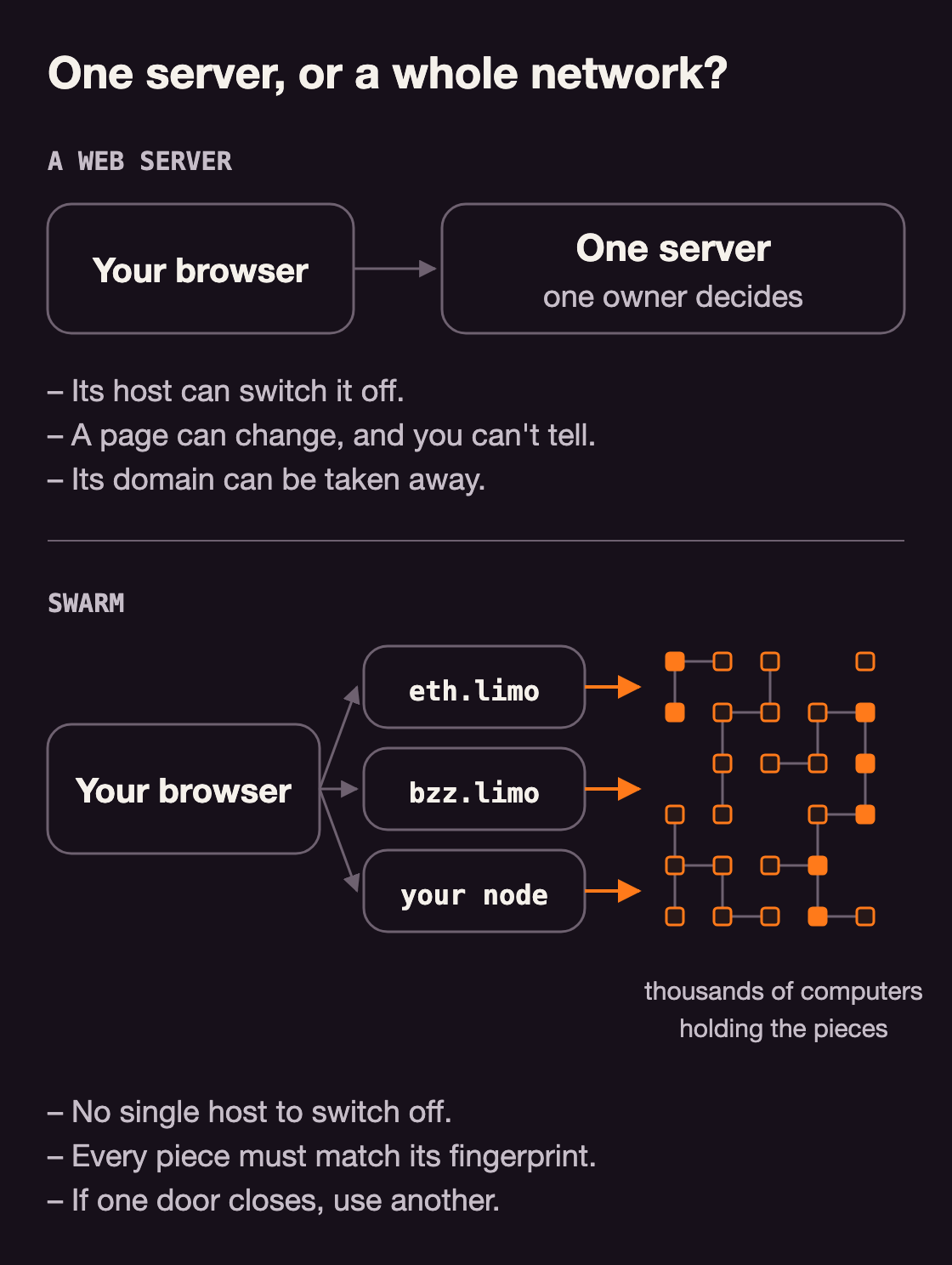
On Swarm there is no such single point. That changes two things: who can switch the site off, and who can change it.
Who can switch it off, or change it?
Switching it off would mean removing it from thousands of computers at once. Swarm spreads every file across the network in small pieces, so there is no single host to pressure. There are also many doors in: eth.limo, bzz.limo and other gateways, or a Swarm node of your own. Freedom Browser, a browser with its own Swarm and IPFS nodes, has that last door built in: type solarpunkbuzz.eth into its address bar and the site comes straight from the network, with no gateway at all. Our name, solarpunkbuzz.eth, lives in the Ethereum Name Service (ENS), a public phone book for the decentralized web, and belongs to our key, so no registrar can take it away.
Changing it quietly does not work either, because on Swarm an address is a fingerprint of the content. Change one comma and the fingerprint is completely different, so a tampered page no longer matches its address. A Swarm node of your own, such as the one inside Freedom Browser, checks every piece it receives against its fingerprint and rejects anything that does not match. Through a gateway, you trust that gateway to do the checking, but you can always open the same address through another gateway or your own node and compare.
There is one honest limit. Storage on Swarm is prepaid with postage stamps, and the ENS name is renewed like a domain. Nobody else can take the site down, but if we stopped paying, it would disappear.
But can a site with no server be dynamic?
Fingerprints have a catch. If every change gives the site a new address, how can a Swarm website ever update? In its first month on Swarm, ours had 43 versions. Without a trick, that would mean 43 addresses, and every link anyone shared would open an old one.
The trick is a feed. A feed is a signpost: its own address never changes, and it points at one thing, the latest version. When we publish, we upload the new version, which gets a new fingerprint, and repaint the signpost to point at it. Every repaint is signed with our key. Anyone can check the signature; nobody else can make one.
A feed is one address that always shows the latest version, and only its owner can update it.
Look at your address bar: solarpunkbuzz.eth.limo, no hash in sight. Our ENS name points at the signpost, and the signpost points at the version you are reading. .limo is the gateway that opens the name in any browser; in Freedom Browser you type solarpunkbuzz.eth and skip the gateway. Name, signpost, version: only the last one changes when we publish.
For developers: a feed is a series of signed updates under one owner and topic. A feed manifest gives it a /bzz/ address that always resolves to the latest update, and the ENS name points at that address. The response header swarm-feed-index shows which update you got, counted from zero in hex: 2a was the 43rd.
Feeds also run the parts of our site that change most often. The Blog list, the five Featured articles and the three track cards each have a feed of their own, so each changes on its own: tick off a roadmap item, and every page that shows that card picks it up the next time it loads. Our publisher can write just those feeds without uploading the site, though for now we also bake each change into the pages, for readers without JavaScript.
By the numbers, in our first month on Swarm: 43 versions of the site, version 47 of the Blog list and version 24 of the AI & DeSci card, all behind one name.
What else can live in a feed?
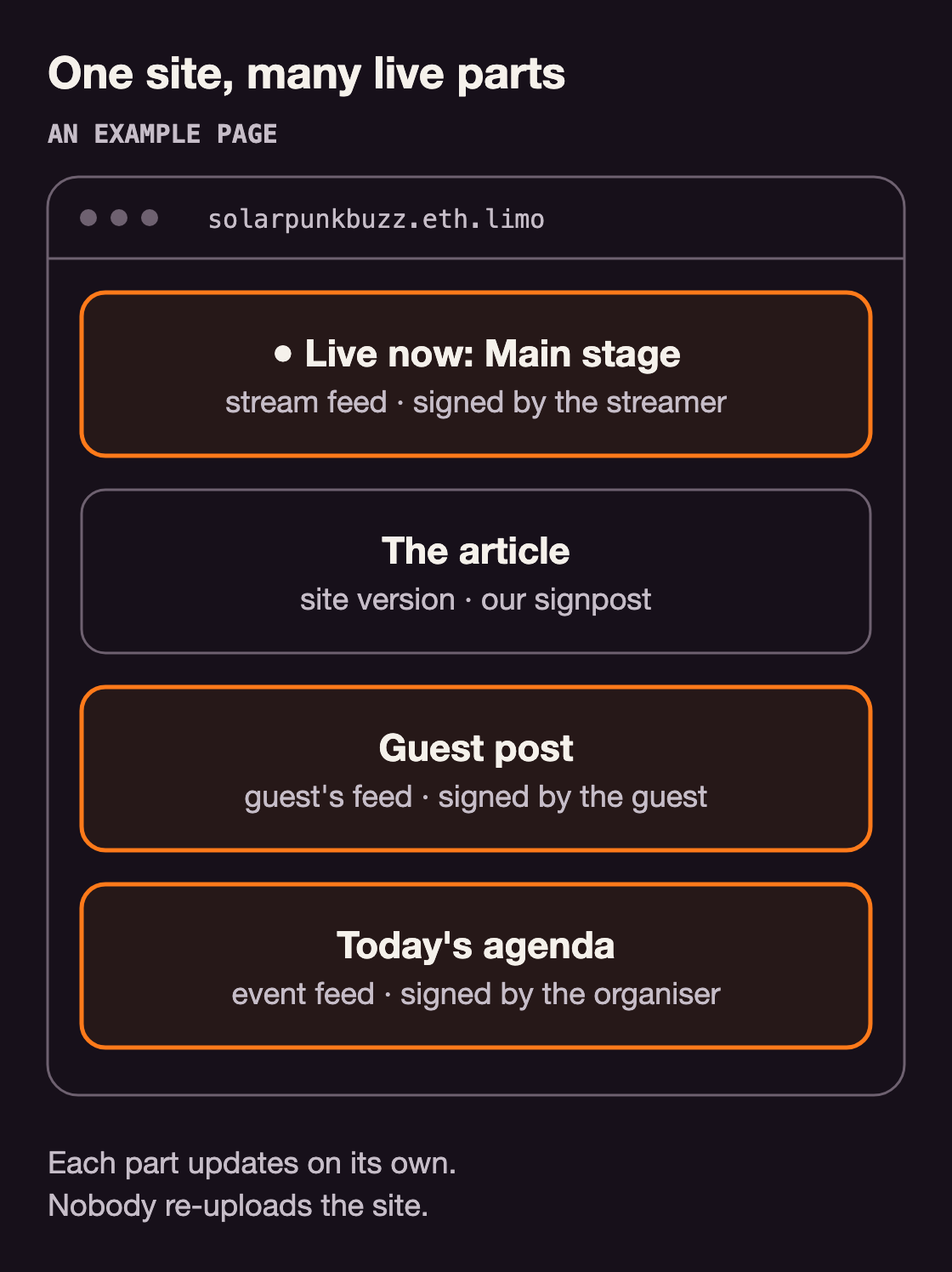
All of our feeds are signed with one key, ours. But a page can read any feed, including ones somebody else signs. That gives a website live parts, each with its own owner, and none of them needs a new upload of the site. We already work this way in live coding without a server, where each collaborator saves their copy of the document to their own signed feed.
One site, many live parts, each with its own owner.
Guest posts. A guest writer keeps their post in their own feed, signed with their own key, and our page lists which guest feeds to show. They can fix a typo or add an update whenever they like, and we never re-upload the site. We can stop showing their feed, but we cannot change a word of it, and any reader can check that the post is really theirs.
A “live now” banner. In live streaming without a platform, the state of each stream already lives in a feed. A page that reads it can show “Live now” when the stage goes on air and hide it when the talk ends, with nobody touching the website.
An agenda that keeps itself current. Put an event's schedule in its own feed, and a room change reaches every visitor the next time their page checks. Our Devcon planner already sits behind a signpost of its own, separate from this site.
And more: a café's menu and opening hours, changed from a phone; translations, each language kept by its own translator; a changelog or status page that the team updates without a release.
If that sounds like a content management system (CMS), it works like one: each part has its own editor. The difference is where everything lives.
- Who edits a part. A classic CMS: people with accounts on the site's server. A Swarm site: whoever holds the key to that part's feed, whether us, a guest or a streamer.
- Where the content lives. A classic CMS: a database on one server. A Swarm site: signed feeds and files, spread across the network.
- Who can take it down. A classic CMS: the host, the platform, or anyone who breaks in. A Swarm site: no single party, and only a part's owner can change it.
- What a change needs. A classic CMS: a login to the server. A Swarm site: one signed feed update, with no new upload of the site.
What happens when we publish?
Merging an approved change on GitHub publishes it. A bot builds the site, uploads it, downloads every file again to compare it byte for byte, and only then repaints the signpost and updates the lists. Each list carries a version number that must go up by exactly one, so two people can never overwrite each other's work.
The catch: one key, one writer. Whoever holds the key can repaint our signposts, so only the publishing bot uses it, and every public file is scanned before upload to make sure the key never ends up in one.
Our bot is one way to do it. With Swarm MCP, an AI assistant does the same upload and repaint in one request.
What does your browser do with all this?
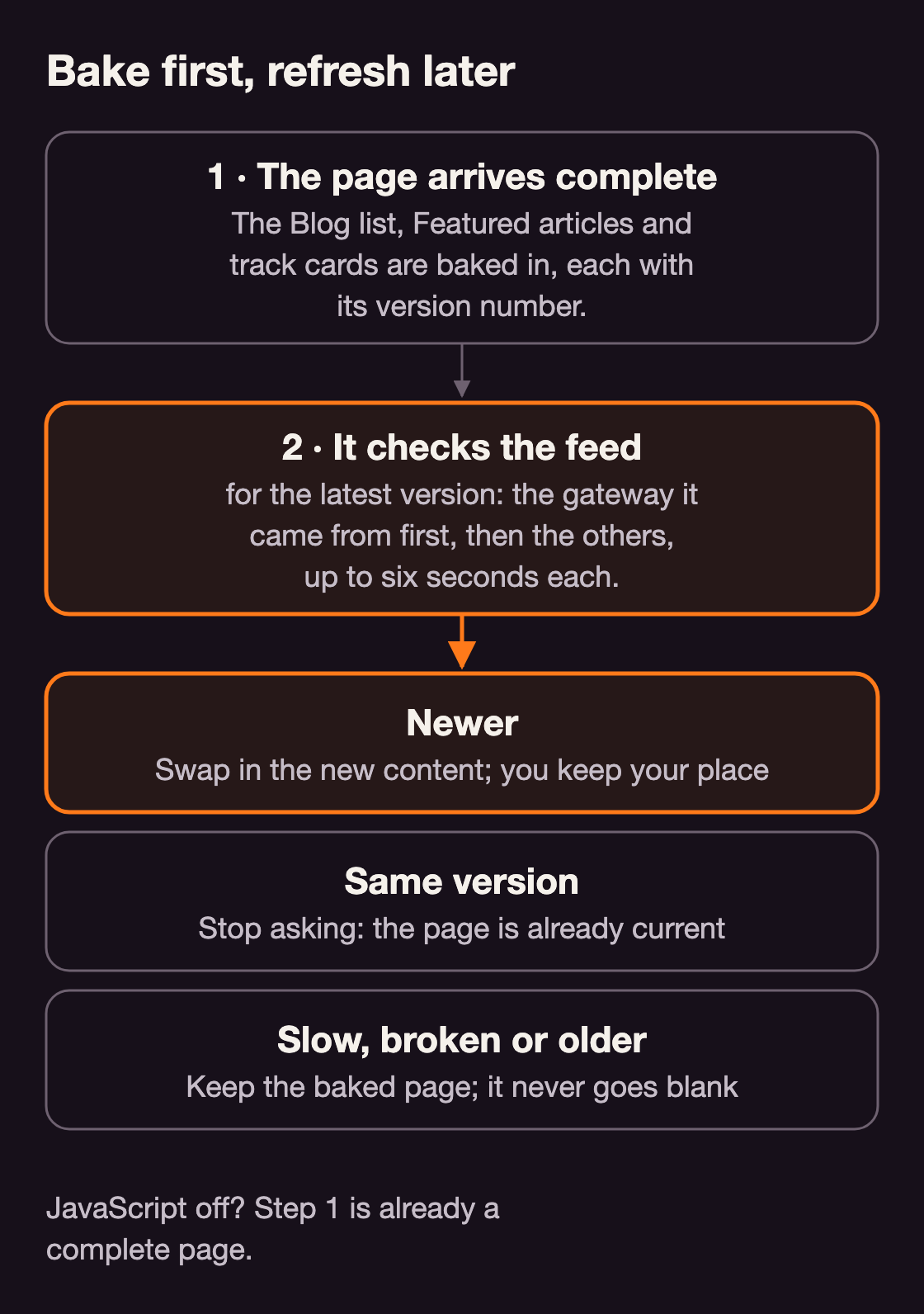
Every page arrives complete. The Blog list, the Featured articles and the track cards are baked into the page, along with a note of which version they are. So you get the full page even on a slow connection, or with JavaScript switched off.
Then the page quietly asks the feed for its latest version: first through the gateway it came from, then the others, six seconds each. Newer? It swaps in the new content without moving your place. Same version? It stops asking. Slow, broken or older? It keeps what it has, so a page never goes blank because a feed did not answer.
Try it: open our Blog list feed in your browser. That is the raw data behind the Blog list; look for its version number, rev, near the top.
For developers: feed content is treated as data, never as code. The page checks every field, inserts it as plain text, and accepts only links that match the site's own /blog/<slug>/ pattern. The same rule would keep a guest's feed from slipping code into the page.
What will you put on Swarm?
A website nobody can switch off, with parts that keep themselves current, is closer than it sounds. Pick a place to start:
See it for yourself. Get Freedom Browser and type solarpunkbuzz.eth: this site, straight from the network, checked piece by piece.
Publish your site in one sentence. Set up Swarm MCP and ask your AI assistant:
Publish my website folder
to Swarm under the feed my-site
It hands back one address. Edit, publish again, and the same address shows the new version, with no Swarm code to learn.
Give it a live part. Ask your assistant to “update the feed opening-hours with Mon–Fri 8–18”, and have your page read that feed the way ours reads the Blog list. The feeds guide shows how.
Talk your idea through with us. Guest posts, a live banner, an agenda, or something nobody has built yet: discuss it with us in Conceptualise.